![Squared - Mark-2000-1.png]](https://help.squared.io/hs-fs/hubfs/Squared%20-%20Mark-2000-1.png?height=40&name=Squared%20-%20Mark-2000-1.png)
If you want to remove a negative keyword from the ' Squared: Account Negative Keyword List', you'll need to do this directly in the platform (If you remove a negative in the shared library list directly in Google Ads, but not in Squared.io, Squared.io will reapply the negative at the next sync).
To find and remove the negative, first head to 'Protect' - 'Negatives'. Use the search box and hit the red 'x' if you find the negative keyword you want removed.

If you can't find the negative at Client level, try the Group level (you can check which groups your client is applied to by heading to the 'Client' page and checking the blue boxes). Use the drop-down at the top of the platform and search for the group/s. Then head to 'Protect' - 'Negatives' to find and remove Group negatives. Finally, check the Global Negative lists to see if it's applied at the top level.
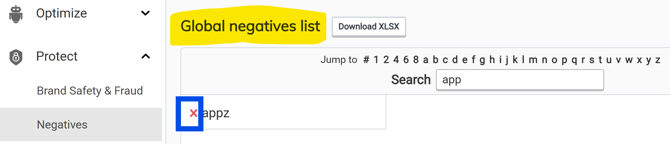
Once you've remove the negative keyword in Squared.io, the negative will be removed from Google Ads at the next sync. If you want to push your change immediately, hit 'sync now' at the top of the page.
If the negative keyword you're looking to remove isn't from the 'Squared: Account Negative Keyword List', it's likely been added by either the Routing negatives or or Negatives for paused exact match keywords automation options.