![Squared - Mark-2000-1.png]](https://help.squared.io/hs-fs/hubfs/Squared%20-%20Mark-2000-1.png?height=40&name=Squared%20-%20Mark-2000-1.png)
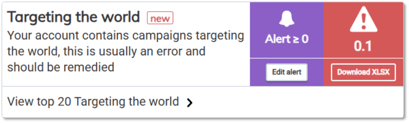
Set up penalty alerts to get notified by email when an account is penalised above the threshold you set. This is really helpful for catching any urgent issues E.g. set the threshold to '0' to be alerted when you start getting penalised for:
-
Set up: Targeting the World, URL expansion, auto-created video
-
Diagnostics: Disapproved ads, sitelinks, keywords
It could also be used to catch sudden changes in performance - e.g. if penalties increase considerably day to day:
-
Performance: Zero conversion, Very low/Low Quality Score keywords
-
Validation: Discontinued, out of stock products
To set these up:
- Navigate to the penalty and click Add Alert:

- Apply your settings:
a) Set your penalty threshold
b) Select which users should be alerted
c) Frequency of alerts (Daily will email every day the penalty breaks the threshold, Weekly will alert you when the penalty threshold is first breached, then not check again for a week)
d) Save changes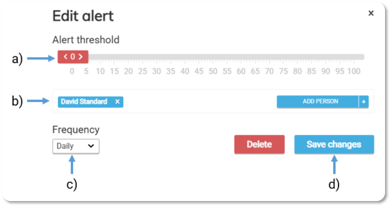
These can be set at account level or group level by hitting 'Add alert' on the relevant penalty before setting the threshold and recipients.